WeetWiz PRO panel, part by part.
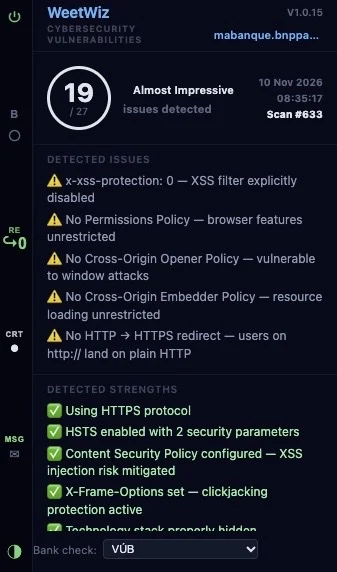
What each button on the left and each block on the right of the popup does. The buttons on the left are the same in both editions; the right side is where PRO shows its details.
1Scanning on / off ⏻
Turns checking on or off for the whole browser. When it's off, WeetWiz sends nothing and uses no scans. Handy while you refresh or re-test a page, or when you want to browse quietly.
2Bank check B
Checks whether the page really belongs to the bank you chose. Compares the web address, the server's IP address and the redirects that led there with the bank's reference.
Click it to see each check: what was expected and what was found.
3Redirects RE
How many times you were forwarded before landing here, for example from an email link through other sites. ↪0 means the page loaded directly. A detour through an unknown site is a typical phishing trick. Click it to see the full chain of addresses.
4Certificate CRT
Who the site's security certificate belongs to and who issued it. On your bank's page, the owner must match the bank. A fake page often has a free certificate anyone can get in minutes, with no owner named.
On other sites: facts only, no verdict (white dot). PRO adds the certificate type, plus expiry date, TLS version and key strength when something is wrong. Firefox reads the certificate itself; Chrome gets it from our certificate server.
5Messages MSG
Report fake site sends the site address, server IP and redirects. Wrong warning on my bank's real page tells us the check made a mistake. Plus short occasional questions about the panel. Nothing is sent unless you click.
6Light / dark ◑
Switches the panel between dark and light mode. Saved only in your browser.
 1
2
3
4
5
6
7
8
9
10
11
12
7Header
Product name, installed version and the site being checked (the address of the current tab).
8Security score
How carefully this website is set up, worked out on the WeetWiz server from the page's security headers and cookie settings. The rating next to it: Impressive, Almost Impressive, Could Be Better or Must Be Better.
It doesn't say whether the site is genuine. That's the job of B and CRT.
9Date, time, Scan #
When this page was checked, and how many scans your key has used.
10Detected issues
Each missing or weak protection on this site, explained in one line.
11Detected strengths
Each protection the site does use well: HTTPS, HSTS, Content Security Policy and more.
12Bank check menu
Pick the bank whose pages WeetWiz should verify. In PRO you can switch between all listed banks.
Shown: WeetWiz PRO on mabanque.bnpparibas with the bank check set to VÚB, so B is grey (not the chosen bank's page) and CRT shows facts only.